
Product Price Settings is supported as of CIMcloud version 2020.R2.
This feature allows you to control the pricing display across the site for your customers. Here you have access to enable or disable multiple settings, and you can even customize the messaging on the platform if you decide to disable pricing in the catalog & cart checkout.
To access these settings at the application level, navigate to the following in the Settings Workspace: System-Wide Settings > Application Settings > Features > Adding to Cart.
The following items can be accessed:
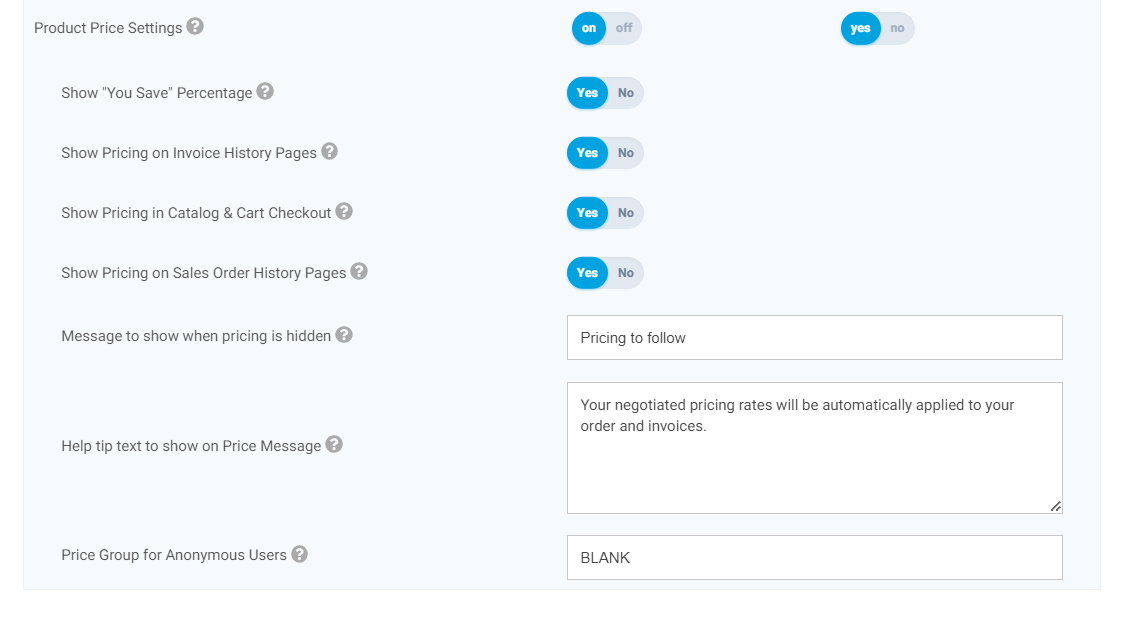
- Show “You Save” Percentage
- This allows you to toggle the you save display in the product catalog. This, when enabled, will display a “You Save” percentage for any products where a customer’s price is below the standard retail price.
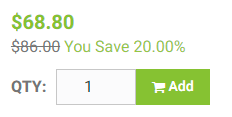
- This allows you to toggle the you save display in the product catalog. This, when enabled, will display a “You Save” percentage for any products where a customer’s price is below the standard retail price.
- Show Pricing on Invoice History Pages
- This toggle will hide pricing on the platform’s invoice history pages.
- Show Pricing in Catalog & Cart Checkout
- This allows you to remove pricing across the website. It is an all or nothing option that when enabled will not show any pricing for any products on the platform. When this setting is enabled your price is replaced with a message and tool tip.
- Show Pricing on Sales Order History Pages
- This toggle will hide pricing on the platform’s sales order history pages.
- Message to show when pricing is hidden
- This message will show where the price should be and will only show if you select to Hide pricing.
- Help tip to show on Price Message
- This text will show in a help tip popup next to the Price Message when pricing is hidden.
- Price Group for Anonymous Users
- This is the price group that will be used for anonymous users or accounts that don’t have a price group set.