
Overview
The Requested Ship/Pickup Date feature is designed to give your online customers the same level of fulfillment flexibility that they would get via phone or email orders. It accomplishes this by adding a specific input area on the payment page where a user can select what date they’d like their order to ship (or be picked up).
Additionally, it can be configured to only display available date options that meet your business days and shipping schedules. As part of this feature this feature the business day calendar needs to be configured as noted here: Effective Order Date Calculated Using Eligible Business Days and Cutoffs
What a Customer Sees
During checkout the user will see a date field with date picker for the allowed set-up days

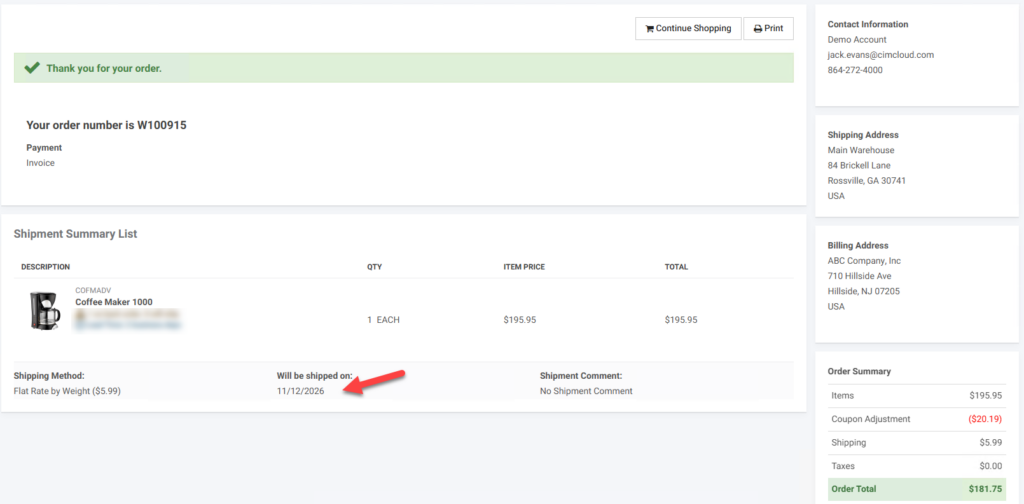
The selected date will be on the confirmation page screen
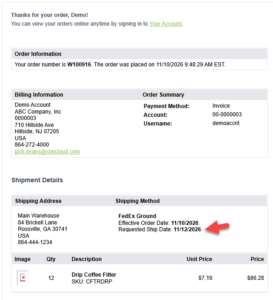
And on the order confirmation email
What an Admin Worker Sees (Set-up)
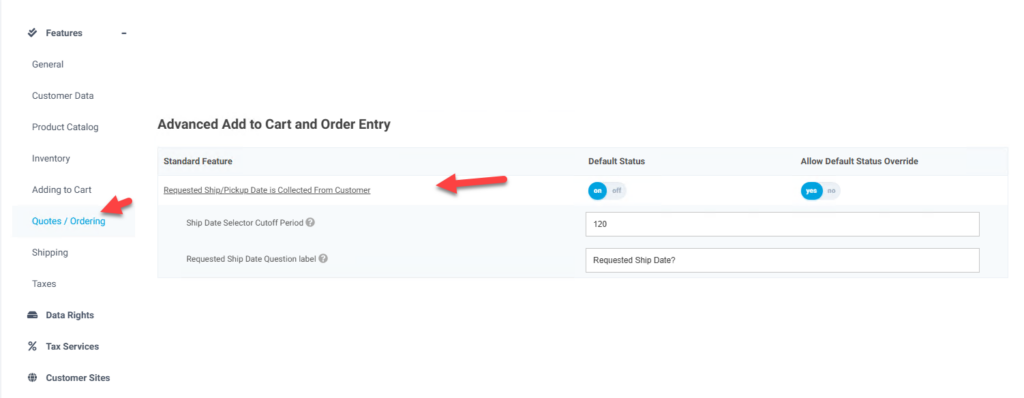
For the calendar to show at checkout as noted above the feature needs to be enabled. There are two feature settings associated with this feature. One to set the maximum number of days out that users can pick (defaulted to 120 days). The other to be able to change the displayed label above the date picker. The feature is in the Quotes/Ordering tab and the Advanced Add to Cart and Order Entry bundle section
After the feature is enabled you should have access to the set up the Business Day Calendar as noted in article – Effective Order Date Calculated Using Eligible Business Days and Cutoffs. This allows you to set up cut-off times and what days are available to be able to select on the calendar.
NOTE: Depending on the ERP and age of the site this selected ship date may or may not be configured to import into the ERP. Contact CIMcloud Support if you are seeing issues with the date imported.